Internet shortcut WRONGLY links to print command.

Since 'print' yielded 10000 results at first attempt, I tried SEARCHing for 'internet shortcut' in the Current User hive, but noticed that the SEARCH was NOT confined to that hive. None of the results showed the combination of terms.
It is just possible that I saw that 'combination' key in a post in some forum, rather than in the registry of MY PC.
 
I have just discovered that a functional internet shortcut has '.lnk' as its extension, but the faulty one that points to the print dialog has '.url'. So there is an error in the FORMATION of the shortcut, rather than its execution.
 
I created a .url shortcut and linked it to this page. It opened my browser and took me right here.
 
Open settings. Type default in the search box. Click on Chose default apps by file type. Scroll down to .URL. What is it pointing to?
 
Just a quick throw in.

It does look, to me, that you have your printer, in some way, setup as your internet browser??
 
Right!!

Checking. But best option I can offer at the moment is go to settings - Apps and features -Default Apps.

Scroll down the list and choose "Reset to Microsoft recommended defaults"
 
It’ overlong, but! My interpetation is that it states you should change you default browser from IE to something else. Not much help doing that, i feel?
 
Correct, I do not want to solve the enigma at the expense of changing my default browser.
 
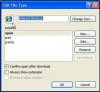
Another lead from doing a direct Google search was an
old thread in which a Windows XP Edit File Type dialog for internet shortcut showed options including PRINT. So I typed 'edit file type' into Win10's SEARCH, and the response is an empty 'DOS' window with the title C:\Windows\System32\edit.com, so SOME progress, but not enough.​
 

Attachments

  • S_C_print.JPG
    S_C_print.JPG
    27.9 KB · Views: 304
Back
Top